AI in Software Testing: The Complete Guide
Last Updated: October 2026
Table of Contents
Software testing is in the middle of its biggest shift since test automation itself. For two decades, “automated testing” meant scripted automation — record a flow, write assertions, run it on a schedule. That model works, but it’s brittle: a changed button ID or a moved element can break a test suite overnight, and someone has to notice, diagnose, and fix it.
AI is changing that equation in a few distinct ways, and it’s worth being precise about which one you’re actually talking about, because “AI testing” gets used as an umbrella term for several different things:
- AI that helps you write tests — generating test cases from requirements, user stories, or existing code
- AI that keeps tests running — self-healing automation that adapts to UI changes instead of breaking
- AI that finds what a human eye would catch — visual regression and visual AI testing
- AI that changes what you can test at all — verifying LLM-based and agentic features, which don’t behave deterministically the way traditional software does
- AI as a teammate inside your QA workflow — using LLMs to draft test plans, summarize failures, or triage bug reports
This guide walks through each of these, what they’re actually good for today, where the limits are, and how to think about adopting them without just bolting “AI” onto a process that has deeper problems.
AI-Powered Test Case Generation
The most mature and widely adopted use of AI in testing is generating test cases — turning a requirement, user story, or piece of existing code into a set of test scenarios a human would otherwise write by hand.
This works well for a specific reason: test case generation is fundamentally a language and pattern-matching problem, which is exactly what large language models are built for. Feed a model a feature description or an API spec, and it can produce a reasonably comprehensive first draft of test scenarios — happy path, edge cases, boundary conditions — far faster than a human starting from a blank page.
What it doesn’t replace is judgment about which of those generated cases actually matter for your product, your users, and your risk profile. AI-generated test cases are a strong starting draft, not a finished test suite.
Where to go deeper: our AI Test Case Generator tool applies this directly, and our guide to using GPT prompts for test case generation walks through specific prompt patterns that produce usable output rather than generic filler.
Self-Healing Test Automation
Self-healing is the answer to test automation’s oldest complaint: tests break constantly because they’re built on fragile references — an element ID, an XPath, a CSS selector — and those references change every time a developer ships a UI update.
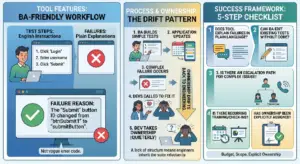
Self-healing automation uses AI (typically a mix of visual recognition and behavioral matching, rather than relying on a single locator) to recognize the element a test is trying to interact with, even after its underlying code changes. Click “the login button” instead of clicking #btn-047a.
The practical effect is a shift in where QA time goes: instead of engineers spending hours a week fixing tests that broke for cosmetic reasons, that time goes toward writing new coverage. It doesn’t eliminate test maintenance entirely — logic changes and genuine behavior changes still need human review — but it removes the single most common and most demoralizing category of flaky-test work.
Where to go deeper: how AI self-healing algorithms are eliminating the “flaky tax” covers the mechanics in detail — what these systems are actually looking at when a locator breaks, and where self-healing still needs a human in the loop.
How CloudQA approaches self-healing. CloudQA keeps test runs deterministic: every run executes the recorded steps and locators exactly as written. Self-healing only starts when a step fails because its element can no longer be found; CloudQA then tries to locate the right element so the run can continue, and reports the recovery so you can review it. Passing tests are never changed behind your back. How CloudQA builds and maintains tests.
Visual AI Testing
Some bugs are invisible to a standard automated test because the test only checks whether an element exists, not whether it looks right. A button that renders 40 pixels too far right, a font that fails to load, a layout that breaks at a specific viewport width — these are the bugs that scripted assertions routinely miss and that a human tester would catch instantly by looking at the screen.
Visual AI testing solves this by comparing rendered screenshots against a baseline and using perceptual comparison (rather than a brittle pixel-for-pixel diff) to flag changes that matter while ignoring ones that don’t — like anti-aliasing noise or a rendered ad that changes every load.
This matters most for teams shipping frequent UI changes, running cross-browser or cross-device coverage, or maintaining a marketing site or storefront where visual polish directly affects conversion.
Where to go deeper: see our AI visual testing overview for how this fits alongside functional test automation rather than replacing it.
Testing AI-Powered and Agentic Applications
This is the newest and least settled category, and it inverts the whole problem. Everything above is about using AI to test software. This is about testing software that itself uses AI — chatbots, recommendation engines, agentic workflows, and anything built on an LLM.
Traditional testing assumes determinism: given the same input, you expect the same output, every time. LLM-based features break that assumption by design. Ask the same question twice and you may get two differently-worded (but both “correct”) answers. That means test assertions built around exact string matching don’t work, and QA teams have had to develop new approaches — evaluating output against criteria and ranges rather than exact matches, testing for harmful or off-brand outputs, and building evaluation sets rather than simple pass/fail scripts.
This is also where the stakes get higher. An agentic feature that can take real actions (send an email, modify a record, execute a transaction) needs to be tested for what it shouldn’t do, not just what it should — which is a fundamentally different testing mindset than verifying a form submits correctly.
Where to go deeper: testing the untestable: QA for probabilistic AI apps and the need for AI apps testing both dig into this shift and what a QA process built for non-deterministic software actually looks like.
LLMs as a QA Teammate
Separate from testing AI, or using AI to generate tests, there’s a third use case: using an LLM as a general-purpose assistant inside the QA workflow itself — drafting test plans from a spec, summarizing why a batch of tests failed, writing bug reports from raw logs, or turning a tester’s shorthand notes into a properly formatted ticket.
This is lower-stakes than the categories above (nothing here is making test-pass/fail decisions on its own) but it’s often where teams see the fastest time savings, because it removes the writing and formatting overhead around testing rather than the testing itself.
Where to go deeper: how LLMs are reshaping QA covers specific workflow patterns teams are using today.
Data Privacy and Ethics in AI-Driven Testing
Any time AI touches your test process, it’s worth asking what data it’s touching too. Test environments frequently contain copies of production data — customer records, transaction histories, personal information — and feeding that into an external AI tool without checking its data handling policies can turn a testing convenience into a compliance problem.
This matters more, not less, as AI gets more embedded in the testing workflow: test case generation tools trained on your codebase, self-healing systems that log screenshots, LLM assistants that see your bug reports. Each of these is a place where sensitive data could leave your controlled environment if you haven’t checked how the tool handles it.
Where to go deeper: data privacy and ethics in test data management covers practical steps for keeping AI-assisted testing compliant.
The Adoption Gap: Why Using AI and Scaling AI Are Different Problems
A pattern shows up across almost every team we talk to: it’s easy to get a pilot working — one engineer tries an AI test-generation tool on one feature, or turns on self-healing for one flaky suite — and much harder to make that the default way the whole team works.
The reasons are rarely technical. They’re usually about trust (a team that’s been burned by a flaky suite doesn’t automatically trust an AI-healed one), process (nobody owns updating the prompts or reviewing AI-generated test cases as the product evolves), and unclear ownership (who reviews an AI-drafted test case before it ships — the same rigor as a human-written one, or less?).
Closing that gap tends to matter more than picking the “best” tool. A well-chosen tool used by two people is worth less than a mediocre one that the whole team actually trusts and maintains.
Where to go deeper: why QA teams use AI but don’t scale it looks at this gap directly and what closing it actually requires.
Where to Start
If you’re evaluating AI in testing for the first time, the order that tends to work best is:
- Start with self-healing, if you have an existing automated suite. It’s the lowest-risk entry point — it doesn’t change what you’re testing, just how resilient the tests are to change — and the payoff (less time firefighting broken locators) is immediate and easy to measure.
- Add AI-assisted test case generation for new features, rather than trying to retroactively regenerate your whole existing suite. Use it to speed up the first draft, then apply the same review standard you’d apply to a human-written test.
- Bring in visual AI testing if UI regressions are a recurring source of missed bugs, particularly for customer-facing surfaces.
- Treat testing AI-powered features as its own discipline, not an extension of your existing suite. If you’re shipping LLM-based or agentic features, budget separate time to build evaluation criteria rather than trying to force them through your existing pass/fail framework.
AI-Assisted QA for IT Services Providers and Agencies
Agencies and IT services firms feel the pressure of AI-era delivery twice: clients expect faster releases, and every project needs testing that is thorough but profitable. The common bottlenecks are manual regression cycles that stretch timelines, automation tools that need specialist skills and constant maintenance, and uneven test coverage across many client applications.
A codeless platform changes the economics: testers record and maintain tests without writing code, the same tests run across every client environment and browser, and scheduled or CI-triggered runs give clients continuous evidence of quality. CloudQA works with services firms in two ways: as a platform your own team uses for client projects, or through our managed QA-as-a-Service team working alongside you. Talk to us about partnering.
Frequently Asked Questions
Does AI replace manual QA testers? No — it changes what manual testers spend time on. AI handles repetitive generation and maintenance work; human judgment is still what decides which tests matter, what “correct” looks like for an ambiguous case, and how to evaluate non-deterministic AI-feature output.
Is AI-generated test coverage as reliable as human-written tests? It’s a strong starting point, not a finished product. Treat AI-generated test cases the way you’d treat a first draft from a junior team member — useful, fast, but reviewed before it ships.
What’s the difference between AI testing tools and testing AI applications? “AI testing tools” use AI to make traditional test automation faster or more resilient (test generation, self-healing, visual comparison). “Testing AI applications” means verifying software that itself uses AI or LLMs, which requires different techniques because the output isn’t deterministic.
Where should a small QA team start? Self-healing automation, if there’s an existing suite to apply it to — it requires the least process change and delivers the most immediately visible benefit.
This guide is part of CloudQA’s ongoing series on AI in software testing. Explore the linked guides above for a deeper look at each approach, or see how CloudQA’s platform applies these techniques directly if you’re ready to try them on your own test suite.
Share this post if it helped!
CloudQA
Automate your web tests without code
- Record tests in your browser
- Run them on every release
- Free plan, no credit card required
Recent articles
Popular guides