
Codeless regression testing
Automated Regression Testing Tool for Web Applications
Record real user workflows once, then re-run them on every release across browsers and environments. No scripting required.
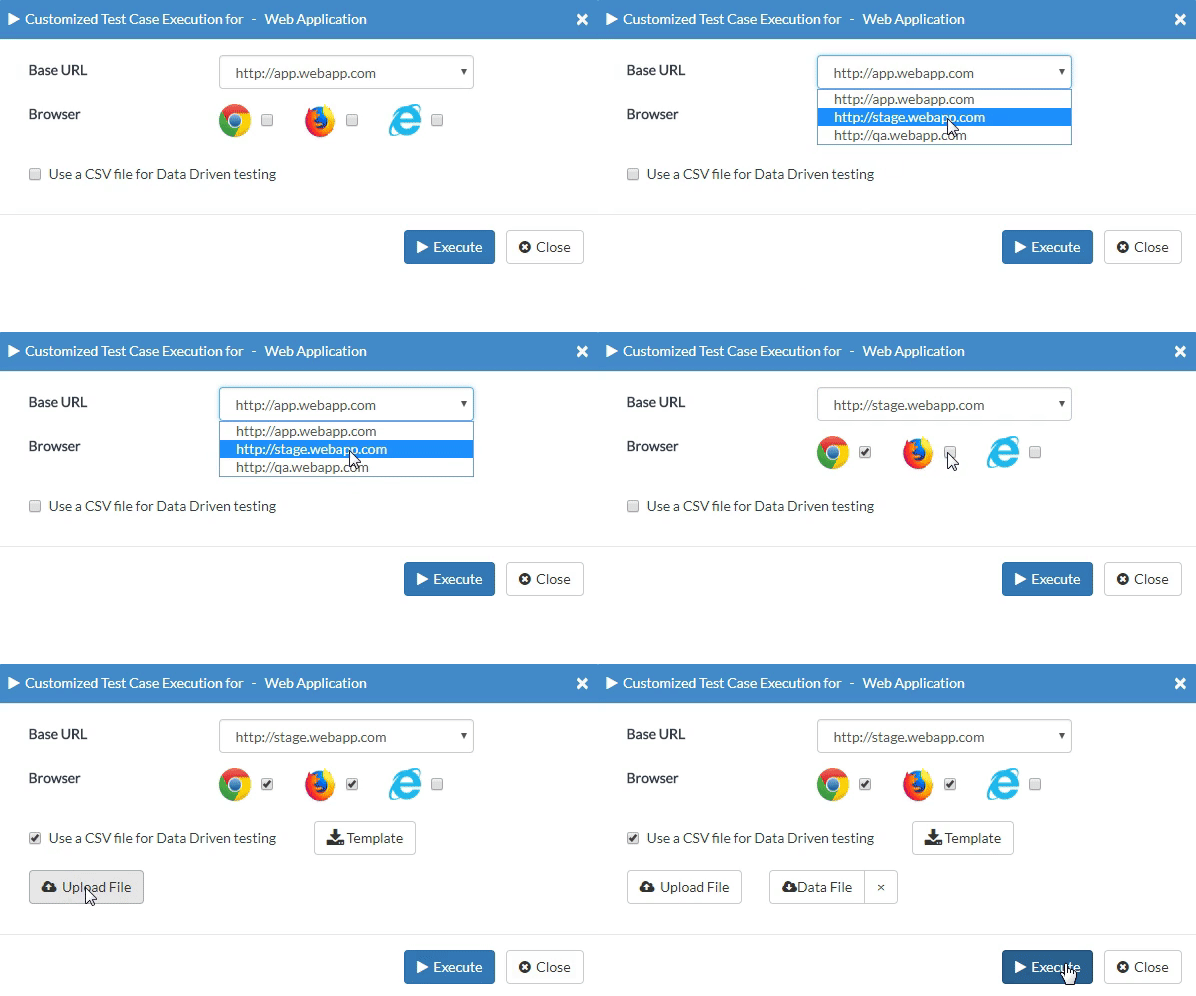
How CloudQA automates regression testing
CloudQA is a codeless, cloud-based regression testing tool for web applications. You record a user workflow in your browser, CloudQA turns it into a reusable automated test, and you re-run your whole regression suite on demand, on a schedule, or from your CI/CD pipeline.
Every run executes the same predefined, auditable steps, so results are repeatable from release to release. Run tests on your own machine for free, or in the CloudQA cloud on Chrome, Firefox and Edge, and switch between dev, staging and production with one setting. Regression testing in CloudQA includes everything enterprise web teams need: cross-browser runs, data-driven testing, reusable steps, API steps and scheduling.
CloudQA regression testing features
Everything you need to build, run and maintain automated regression tests for web applications, without writing code.
Record tests in your browser
Click through a real user journey with the CloudQA Chrome extension. Each action becomes a readable test step, with no code to write. How tests are built →
Visual editor, custom JavaScript optional
Add, delete or reorder steps and add assertions and waits in a visual editor. Developers can add a custom JavaScript step when a check needs logic. Codeless testing guide →
Reusable modules
Save common sequences such as login as shared modules. Change a module once and every test that uses it is updated.
Data-driven testing
Download auto-generated templates, then run one test against many data sets. Use variables and random data to cover more cases with fewer tests.
Cross-browser cloud runs
Run suites in parallel in the CloudQA cloud on Chrome, Firefox and Edge, with no browser grid to build or maintain. Cross-browser testing →
One test, every environment
Keep URLs, accounts and data in environment variables, so the same test runs against dev, staging and production.
Scheduling, reports and alerts
Schedule suites at any time and frequency. Every run produces a step-by-step report with page performance metrics, and failures notify the right people.
CI/CD integration
Trigger test suites from your pipeline through the CloudQA APIs. Customers run CloudQA with tools such as Jenkins, Azure DevOps and Travis CI. Running tests in CI/CD →
API testing steps
Check the APIs behind your user journeys in the same test, alongside the UI steps. API testing →
Built for modern web apps
Shadow DOM and iframes work out of the box. Automatic waits for page loads and AJAX and multi-attribute locators keep tests stable.
Deterministic runs, self-healing on failure
Every run follows the recorded steps exactly, so results are repeatable. Only when a step fails because its element is gone does CloudQA try to locate the right element, and it reports the recovery for review.
Private runs behind your firewall
Run tests on a machine or runner inside your network, or use static IPs and a site-to-site tunnel for cloud runs.
Why teams choose CloudQA
Intuitive for non-coders, flexible for skilled testers, cloud runs without costly infrastructure, CI/CD integration and responsive support from experienced test engineers.
Regression testing with CloudQA in four steps
From the first recording to a suite that runs on every release.
1. Record a workflow
Use the CloudQA browser recorder to click through a real user journey, such as sign-up, checkout or search. Each action becomes a readable test step. No code needed.
2. Make it reusable
Turn repeated steps into shared building blocks, add assertions, and attach a CSV file to run the same test with many sets of data.
3. Run it everywhere
Run the suite on your own machine for free, or in the CloudQA cloud on Chrome, Firefox and Edge, against dev, staging or production. Schedule runs or trigger them from your CI/CD pipeline.
4. Review and fix fast
See step-by-step results and page performance metrics for every run, and get notified when a regression slips in.
Regression testing FAQ
What is automated regression testing?
Regression testing checks that features which already worked still work after a code change. Automated regression testing records those checks as tests that a tool re-runs on every build or release, so your team finds breakages in minutes instead of repeating the same manual clicks before each launch.
Do I need to know how to code to use CloudQA?
No. You build tests by recording workflows in your browser and editing the steps in a visual editor. Anyone who knows the application can automate tests. Developers can still add custom JavaScript steps when they need them.
Does CloudQA use AI to run tests?
No. Every run follows your recorded steps and locators exactly as written, so results are repeatable from release to release. Only when a step fails because its element can no longer be found does CloudQA try to locate the right element, and it reports that recovery so you can review it. CloudQA’s free AI Test Case Generator can help you draft test cases, but it is not part of test execution.
Which browsers can I run regression tests on?
The free Kickstart plan runs tests on Chrome. Scale Up and QA-as-a-Service run tests in the CloudQA cloud on Chrome, Firefox and Edge. Safari and specific browser versions are available on custom plans.
Can I run CloudQA tests from my CI/CD pipeline?
Yes. You can trigger test suites through the CloudQA API from your CI/CD tool, schedule runs for any time and frequency, and get notified of the results.
Can CloudQA test applications behind a firewall?
Yes. You can run tests on a local machine or a runner inside your network. For cloud runs, static IPs and a site-to-site tunnel are available. Your application data stays in your environment, and there is no AI in the test execution path.
How much does CloudQA cost?
Kickstart is free forever and needs no credit card. Scale Up, for running tests in the cloud, costs $119 per month, or $99 per month billed annually. QA-as-a-Service, where CloudQA experts build and maintain your tests, is custom-priced. See the pricing page for details.