Last updated: October 2026
Quick answer
Continuous testing in agile means testing happens throughout the sprint, not at the end: requirements are testable before work starts, automated tests run on every commit and build, regression and smoke suites gate each deploy, and production is monitored after release. The best practices are to involve QA from planning, automate the repetitive checks in your CI/CD pipeline, keep feedback fast, test in production-like environments and treat test failures as the team’s top priority.
What is continuous testing?
Continuous testing runs automated tests as part of every step of delivery, so each change gets fast feedback on business risk. It is what makes frequent agile releases safe: instead of a long test phase before launch, quality is checked continuously from the first story to production.
Best practices for continuous agile testing
1. Bring QA into planning
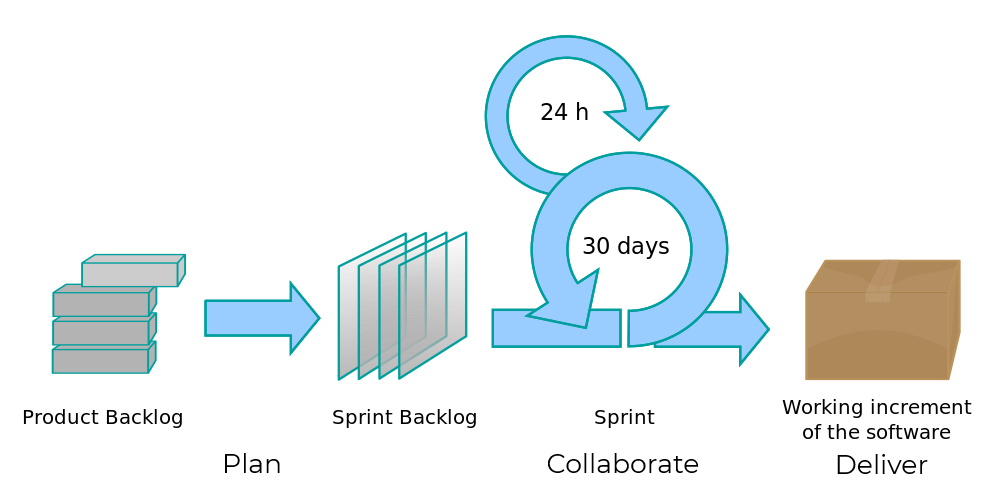
Testers help write acceptance criteria and example scenarios during backlog refinement, so stories are testable before development starts and misunderstandings surface early.
2. Make tests part of the definition of done
A story is not done until its automated tests exist and pass. This keeps automation in step with the product instead of lagging behind it.
3. Follow the test pyramid
Many fast unit tests, a solid layer of API and integration tests, and a focused set of end-to-end UI tests for the critical journeys. Too many slow UI tests make pipelines slow and flaky.
4. Automate in the CI/CD pipeline
Run unit and API tests on every commit, a smoke suite on every build and deploy, and the broader regression suite on every merge or nightly. See CI/CD pipeline best practices.
5. Keep feedback fast
Developers should know within minutes if a change broke something. Run tests in parallel in the cloud, split long suites into tiers, and prioritize tests by risk.
6. Use production-like environments and data
Test against environments and data that resemble production, and run the same tests across dev, staging and production with configuration rather than separate scripts.
7. Fix broken and flaky tests immediately
A red pipeline should stop the line. Flaky tests that pass and fail at random destroy trust; fix them or take them out of the gating suite until they are fixed.
8. Keep exploratory testing
Automation checks known behavior. Time-boxed exploratory sessions each sprint find the issues nobody thought to script.
9. Monitor in production
Continuous testing does not stop at deploy. Synthetic monitoring of key journeys and real user monitoring close the loop.
10. Measure and improve
Track lead time, change failure rate, escaped defects, pipeline duration and flaky test rate, and review them in retrospectives.
Why cloud matters for continuous testing
Running suites on every change needs browsers, environments and parallel capacity on demand. Cloud-based test execution removes the need to maintain a test lab or browser grid, and scales up for big regression runs and down when idle. See why continuous testing and cloud go together.
Continuous testing with CloudQA
CloudQA lets the whole agile team build automated tests without code, then run them in the cloud on Chrome, Firefox and Edge, across environments, on a schedule or from your CI/CD pipeline. Every run executes the same predefined steps, so a failure points to a real change; self-healing only starts after a step fails, and recovery is reported. See CloudQA regression testing and how to improve regression testing in agile.