
Test Automation for Legacy Web Applications: What Modern AI Tools Miss
Last Updated: September 22nd 2026
Quick answer: Most newer test automation tools – especially AI-native platforms that generate tests directly from source code – are built and tuned against modern JavaScript frameworks like React, Angular, and Vue. Legacy enterprise applications (older ASP.NET, JSP, server-rendered portals, embedded third-party widgets common in banking, insurance, and healthcare systems) often don’t fit those assumptions cleanly, which means “AI-generated tests” can require far more manual correction on legacy stacks than the marketing implies.
Table of Contents
Why this gap exists
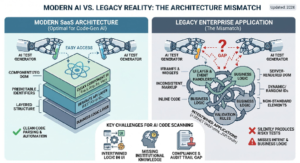
Test automation vendors build and demo their products against the applications most common in their target market – and right now, that’s modern SaaS products built on current JS frameworks with clean component structure. It’s a reasonable choice for a startup optimizing for the biggest addressable market. But it leaves a real gap for the applications that make up a large share of enterprise IT: applications that were built 8, 12, 20 years ago, patched continuously since, and never rewritten.
If your organization runs any of the following, you’ve likely felt this gap already:
- Server-rendered portals (ASP.NET WebForms, older JSP/Struts applications)
- Core banking, claims, or policy administration systems with decades of incremental changes
- Applications with embedded third-party widgets, iframes, or legacy Flash-to-HTML5 migrations
- Systems where the UI layer and the business logic are tightly coupled in ways modern frameworks don’t have
Where AI-native and code-generation-based tools tend to struggle here
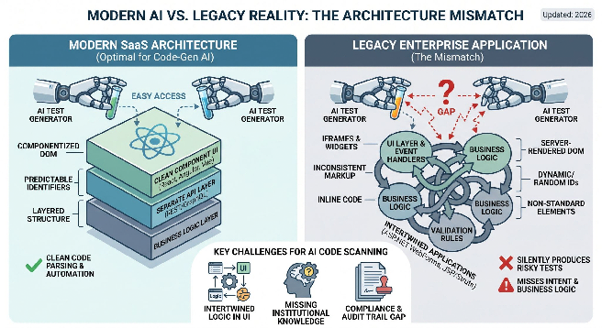
Inconsistent or non-semantic markup. Tools that rely on reading clean, componentized source code to auto-generate tests do best when the DOM reflects modern framework conventions. Decades-old server-rendered markup, inline event handlers, and non-standard element structures reduce the reliability of that approach – often silently, with the tool producing tests that pass in ways that don’t reflect real user risk.
Business logic buried in the UI layer. Legacy applications frequently embed validation and business rules directly in UI code rather than in a clean separated layer. AI test generation tools reading “the code” can miss what a rule is actually for, because the intent isn’t expressed anywhere the tool can parse.
Compliance and audit requirements. Regulated industries (banking, insurance, healthcare) often need documented test evidence tied to specific regulatory or audit requirements – not just pass/fail results. Tools built for fast-moving SaaS teams rarely have this as a first-class feature; it’s frequently an afterthought or missing entirely.
Institutional knowledge that isn’t in the code. Why does this validation rule exist? What edge case did it get added to catch? On a 15-year-old system, that context often lives with people, not documentation – and a code-scanning AI tool has no way to recover it.
What actually works for legacy enterprise testing
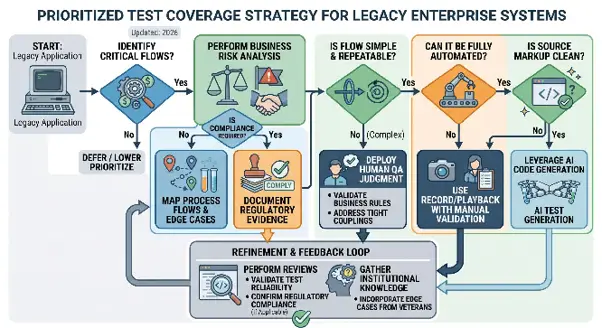
- Combine record/playback with human QA judgment, rather than pure code-to-test generation. For legacy UIs, testing what a real user does and sees is often more reliable than inferring intent from decades-old source.
- Prioritize by business risk, not by ease of automation. The highest-risk flows in a legacy banking or insurance app are often the least “automatable” by modern tooling standards – which is exactly why they need deliberate human-led automation design, not a fully automated pass.
- Bring in people who’ve actually worked inside these systems. Automation strategy for a 15-year-old claims processing system benefits enormously from someone who has debugged one before, not just someone who’s expert in a modern testing tool.
- Treat compliance documentation as a requirement, not a nice-to-have, when selecting a testing approach for regulated industries.
The honest trade-off
Modern AI-native testing tools are genuinely impressive on modern applications, and if that’s what you’re running, they’re worth serious consideration. The gap we’re describing here isn’t a knock on that technology – it’s a mismatch between what most of that technology is optimized for and what a large share of enterprise IT actually runs. If your application predates the last decade of frontend framework conventions, weight vendor claims about “AI test generation” accordingly, and ask specifically how they handle server-rendered, non-componentized applications before you buy.
FAQ
Can AI-powered test automation tools work on legacy web applications? Some can, with varying reliability. Tools that generate tests by scanning source code tend to perform best on applications built with modern component-based frameworks, and less reliably on older server-rendered or non-standard markup – a gap that’s often not obvious until you’re mid-implementation.
What should I ask a testing vendor before automating a legacy enterprise application? Ask for a reference customer running a comparably old application (not just their newest, most modern client), ask how their tool handles non-standard markup and embedded third-party widgets, and ask what compliance/audit documentation the tool produces out of the box.
Is codeless testing a good fit for regulated industries like banking and insurance? It can be, but the deciding factor is usually less about “codeless vs. coded” and more about whether the vendor understands regulated-industry requirements – audit trails, documented test evidence, and handling of legacy system quirks – not just general test creation speed.
Share this post if it helped!
RECENT POSTS
Guides

How To Select a Regression Testing Automation Tool For Web Applications
Regression testing is an essential component in a web application development cycle. However, it’s often a time-consuming and tedious task in the QA process.

Switching from Manual to Automated QA Testing
Do you or your team currently test manually and trying to break into test automation? In this article, we outline how can small QA teams make transition from manual to codeless testing to full fledged automated testing.

Why you can’t ignore test planning in agile?
An agile development process seems too dynamic to have a test plan. Most organisations with agile, specially startups, don’t take the documented approach for testing. So, are they losing on something?

Challenges of testing Single Page Applications with Selenium
Single-page web applications are popular for their ability to improve the user experience. Except, test automation for Single-page apps can be difficult and time-consuming. We’ll discuss how you can have a steady quality control without burning time and effort.
Why is Codeless Test Automation better than Conventional Test Automation?
Testing is important for quality user experience. Being an integral part of Software Development Life Cycle (SDLC), it is necessary that testing has speed, efficiency and flexibility. But in agile development methodology, testing could be mechanical, routine and time-consuming.

