The Challenge
Salesforce is a genuinely difficult platform to automate well, and the difficulty is structural rather than incidental. Three characteristics of the platform combine to make naive automation approaches fail quickly:
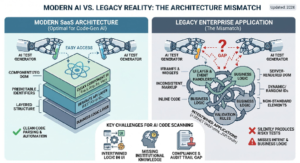
A dynamic DOM. Salesforce’s Lightning interface generates much of its markup dynamically, and element attributes — including IDs and classes automation would normally rely on — can change between sessions or even between renders of the same page. Selectors that work today can silently stop working tomorrow, with no code change on the testing side to explain why.
Lightning components. Salesforce’s component framework renders complex UI elements — dynamic forms, dropdowns, data tables, pop-ups — through its own internal structure rather than plain HTML controls. These components often don’t expose the kind of simple, stable attributes that standard selector strategies expect, which makes reliably identifying and interacting with them harder than automating a conventional web form.
OTP-based MFA. Salesforce’s one-time-password multi-factor authentication is, like most MFA, deliberately resistant to automated bypass. A test suite that has to clear an OTP challenge on every run either can’t run unattended at all, or has to solve session persistence some other way.
Compounding all three: the goal wasn’t to verify isolated pages in a vacuum, but to automate complete business workflows — multi-step processes spanning several Salesforce screens, involving navigation, data entry, validation, and record updates in sequence. Any one unstable step in a long workflow can break the entire run, which raises the stakes on getting each of these problems solved properly rather than patched around.
The Solution
Stable Selector Strategy for a Dynamic DOM
Rather than relying on the kind of single-attribute selectors that break the moment Salesforce regenerates its markup, we identified genuinely stable selectors where they existed and built custom selector strategies for the elements where they didn’t. This meant looking past whatever attribute seemed most convenient at first glance, and instead identifying the properties of each element that actually stayed consistent across sessions and re-renders — the difference between automation that survives Salesforce’s normal behavior and automation that has to be rewritten every time the DOM regenerates.
Solving OTP/MFA With a Persistent Authenticated Session
As with session-based authentication generally, trying to script around an OTP challenge on every execution is both fragile and, for most implementations, not a reliable long-term approach. Instead, we used a dedicated Chrome Profile / Debugger Profile to maintain an already-authenticated Salesforce session. Because the profile retains valid login state between runs, automated executions connect to a session that has already cleared OTP validation, rather than triggering a fresh MFA challenge every time.
A Dedicated, Isolated Execution Environment
We configured a dedicated VM specifically for Salesforce test execution, separate from other automation infrastructure. This gives Salesforce automation a consistent environment run after run — no state bleed from unrelated projects, no resource contention, and a much shorter path to diagnosing a failure when one does occur, since the environment itself is a known, controlled variable rather than a moving target.
Automating Salesforce’s Complex UI Components
Salesforce-specific components — dynamic forms, dropdowns, data tables, pop-ups, and Lightning components generally — needed automation logic built for how they actually behave, not treated like standard HTML controls. This meant building interaction strategies specific to each component type: handling dropdowns that render their options dynamically, tables that load and paginate data asynchronously, and pop-ups that need to be detected and handled without stalling the workflow behind them.
Selector Maintenance and Healing
To keep the suite stable as Salesforce elements and attributes change over time, we used fallback selector strategies so that when a primary selector no longer matches, the automation can still locate the correct element through an alternate identifying property. Just as important: when a selector does need to be updated, it can be updated directly — without re-recording the entire test from scratch. That distinction matters over the life of a test suite; the cost of Salesforce’s inevitable UI drift becomes a small, targeted fix instead of a rebuild.
Full End-to-End Workflow Automation
With the underlying stability problems solved, we automated complete business workflows across multiple Salesforce screens — not individual pages checked in isolation, but full processes: navigating between screens, entering data, validating it, and updating records, all within a single automated run that mirrors how a real user actually moves through the system. This is a meaningfully higher bar than page-level testing, since a failure anywhere in the chain has to be caught, and every step depends on the ones before it having completed correctly.
The Outcome
The result is a Salesforce automation suite that runs complete, multi-screen business workflows unattended — without manual OTP entry, without breaking every time Salesforce regenerates an attribute, and without needing a full test rewrite every time a Lightning component’s markup shifts. By solving authentication, environment stability, and selector resilience as foundational problems first, the workflows built on top of them — the actual business processes Innovate needed covered — could be automated end-to-end rather than only in fragile pieces.
Key Takeaways
- Treat Salesforce’s dynamic DOM as the default, not the exception. Selector strategy has to account for change from day one, not react to it after tests start failing.
- Persistent authenticated sessions solve MFA more reliably than trying to automate around it. This applies as much to OTP-based MFA on Salesforce as it does to any other MFA implementation.
- Lightning components need component-aware automation logic, not generic selectors borrowed from standard HTML testing.
- Selector healing should let you patch, not rebuild. The ability to update a single broken selector — rather than re-record an entire test — is what keeps a long-lived suite maintainable.
- Automate the workflow, not just the page. Multi-screen, end-to-end coverage catches issues that isolated page-level tests would miss entirely.